Camera Company
Company
Shop By Category
T&Cs
Shop Online
  • The maker's specifications on every page
  • Free tracked delivery across Singapore over $150
  • 14-day returns

4K Dash Cam with WiFi and GPS | Front dash camera | Car dashboard camera

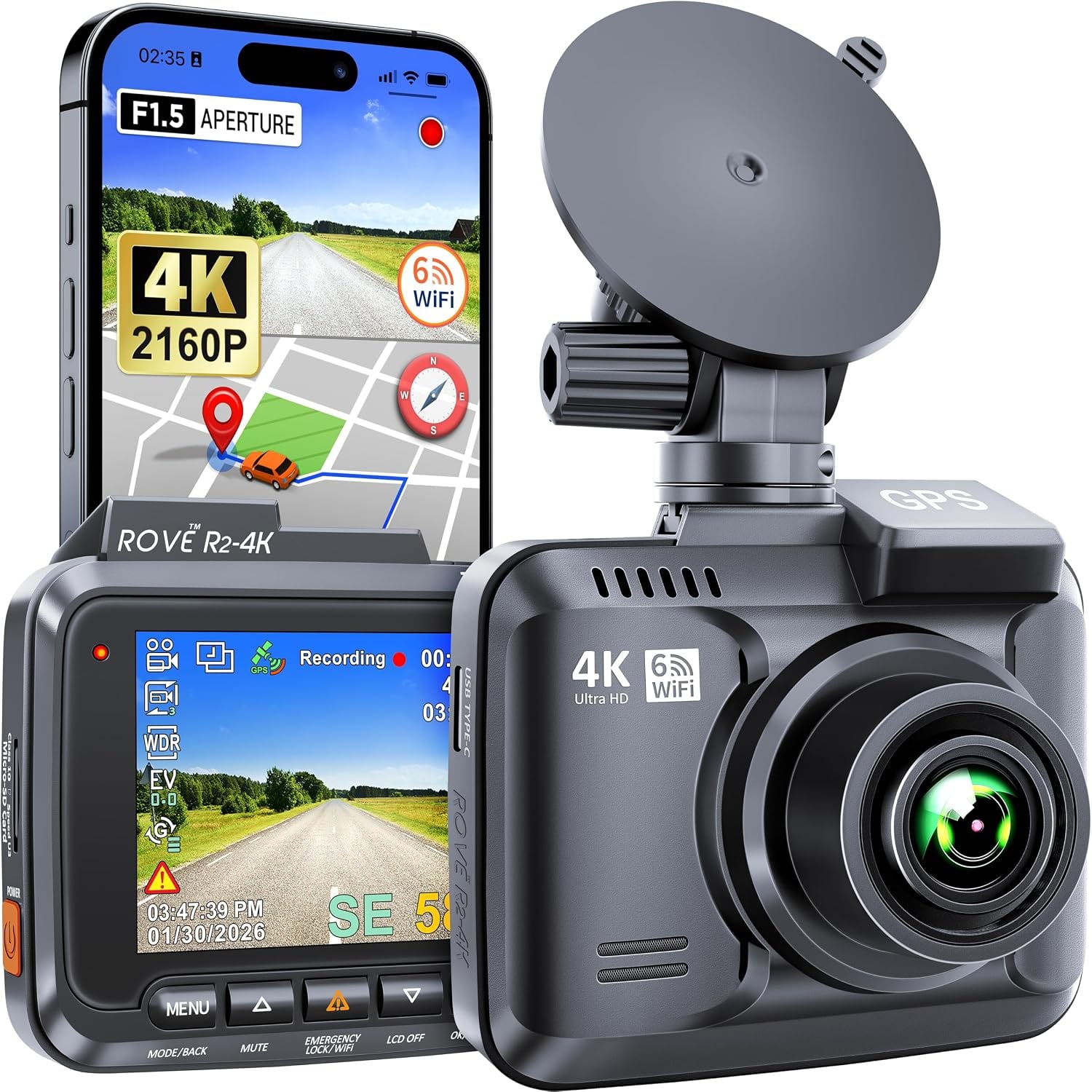
4K WiFi Dash Cam with GPS

$355.99 $426.99 Save $71
  • 4K Ultra HD
  • Phone Transfers
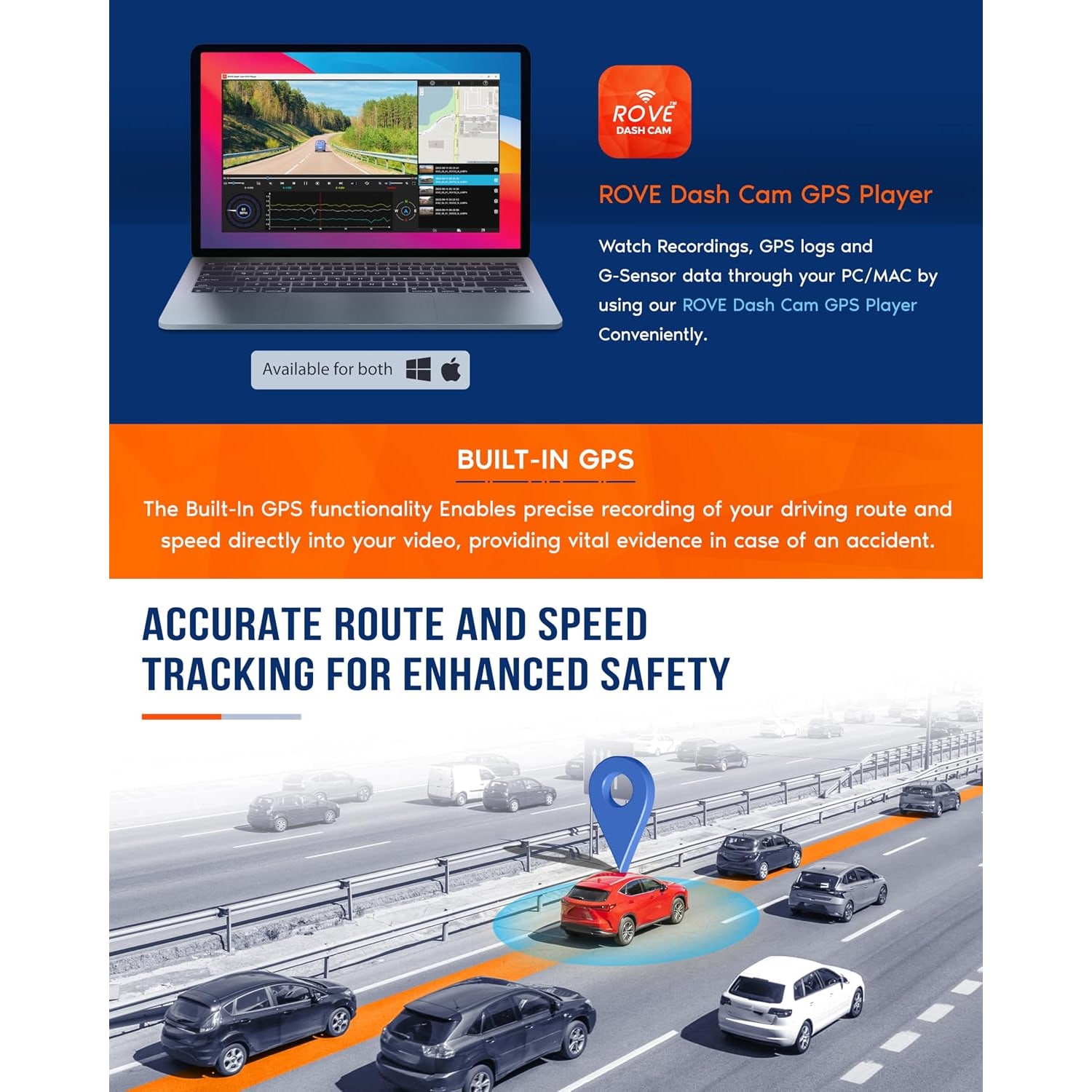
  • GPS Route Log
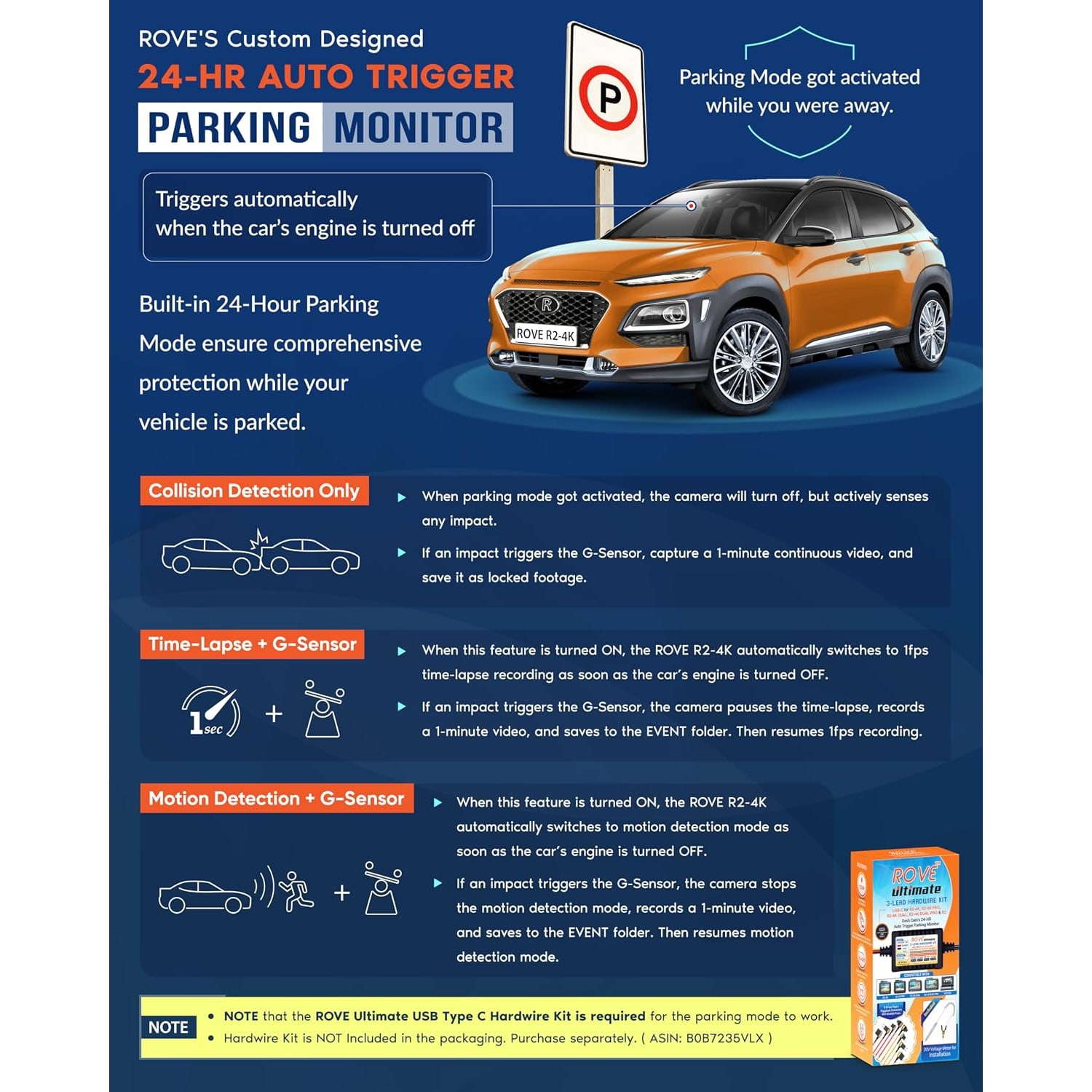
  • Parking Monitor

Price: $355.99 $426.99

  • Free tracked delivery across Singapore on orders $150+, otherwise a flat $20
  • Pay by card or PayPal, handled by the payment provider
  • 14 days to change your mind, plus your statutory rights
Product specifications
BrandROVE
ModelR2-4K
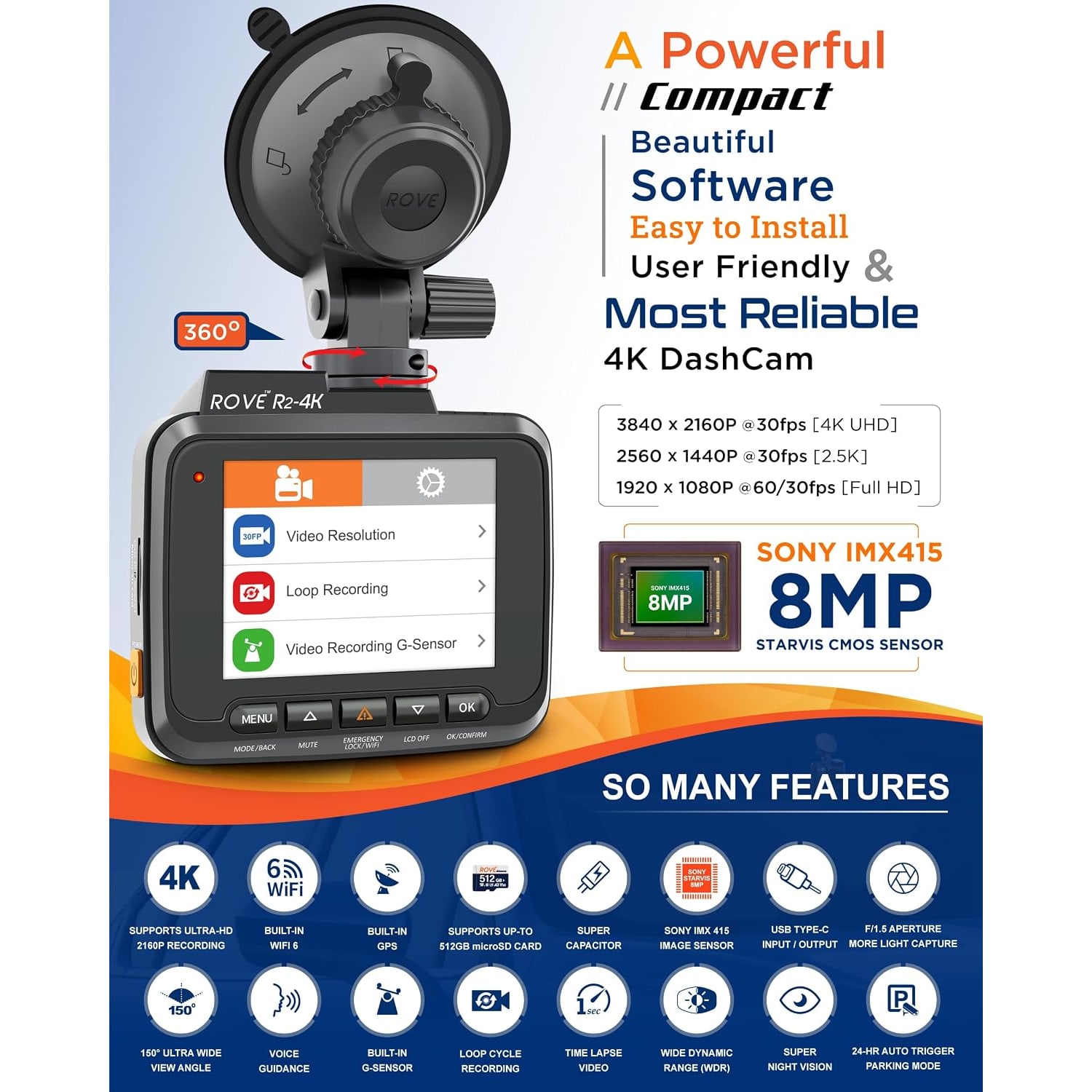
Video Resolution2160p (4K Ultra HD)
Frame Rate60 fps / 120 fps
Field of View150 degrees
Maximum Aperturef1.5
SensorCMOS
Screen2.4 inch LCD
ConnectivityWi-Fi
Control MethodApp
Mounting TypeWindscreen mount
Camera PositionFront
Memory TypeMicroSD
Memory Slots1
Memory Storage CapacityUp to 512 GB
Video FormatMP4
BatteryLithium ion, included
Special FeaturesLoop cycle recording, G-sensor, motion detection, parking monitor, free ROVE app
Included ComponentsCar charger, charging cable, user manual, warranty card
ColourBlack
Item Dimensions (D x W x H)6.4 x 6.5 x 3 cm
Item Weight517 g
Number of Items1
Weight517 g
Shipping & returns

Tracked delivery anywhere in Singapore. It is free on orders of $150 or more, and a flat $20 below that.

If it is not right for you, send it back within 14 days of delivery in resaleable condition and we refund the price you paid, including standard delivery. That is a voluntary policy we offer on top of your legal rights. You cover the cost of returning it unless the item is faulty.

If it arrives faulty, damaged or not as described, we put it right at no cost to you, return postage included, and your protection under the Consumer Protection (Fair Trading) Act 2003 is unaffected.

Shipping details · Refunds and returns

4K Ultra HDRecords at 2160p so number plates and road signs stay readable.
Phone TransfersBuilt-in WiFi sends clips to the ROVE app on iOS or Android.
GPS Route LogRecords your location and speed alongside the footage.
Parking MonitorG-sensor and motion detection keep watch while you are away.

Drive with a clear record of every trip, thanks to a 4K dash cam with WiFi and GPS that keeps watch from your windscreen.

Records 2160p video through an f1.5 six-glass lens with a 150 degree view, logs your route and speed by GPS, and sends clips straight to your phone over built-in WiFi.

Records your drive in 4K Ultra HD at 2160p, which keeps fine detail like number plates and signage clear enough to be useful later.

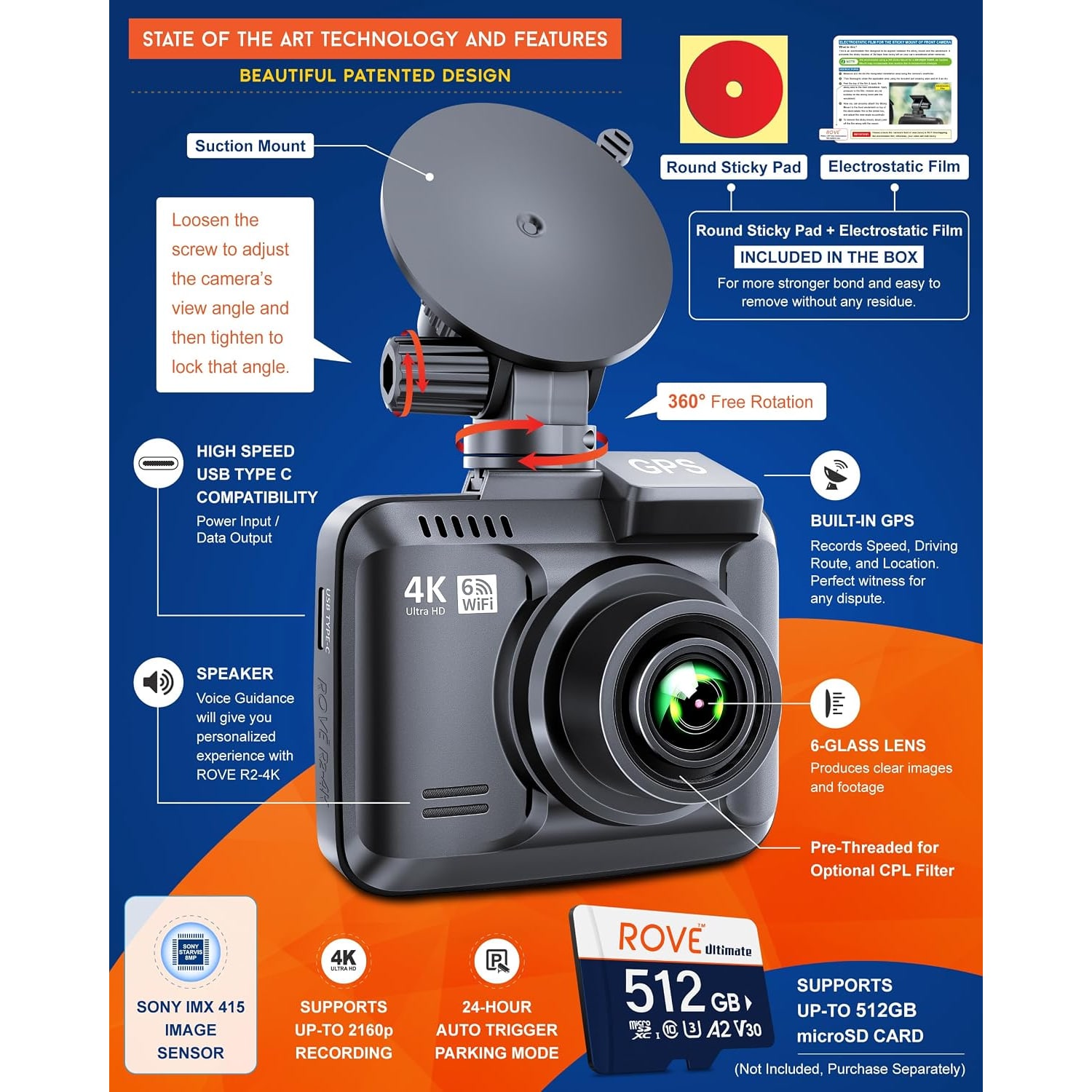
A six-glass lens with an f1.5 aperture and a CMOS sensor pulls in more light, so footage at night and in heavy rain holds up better.

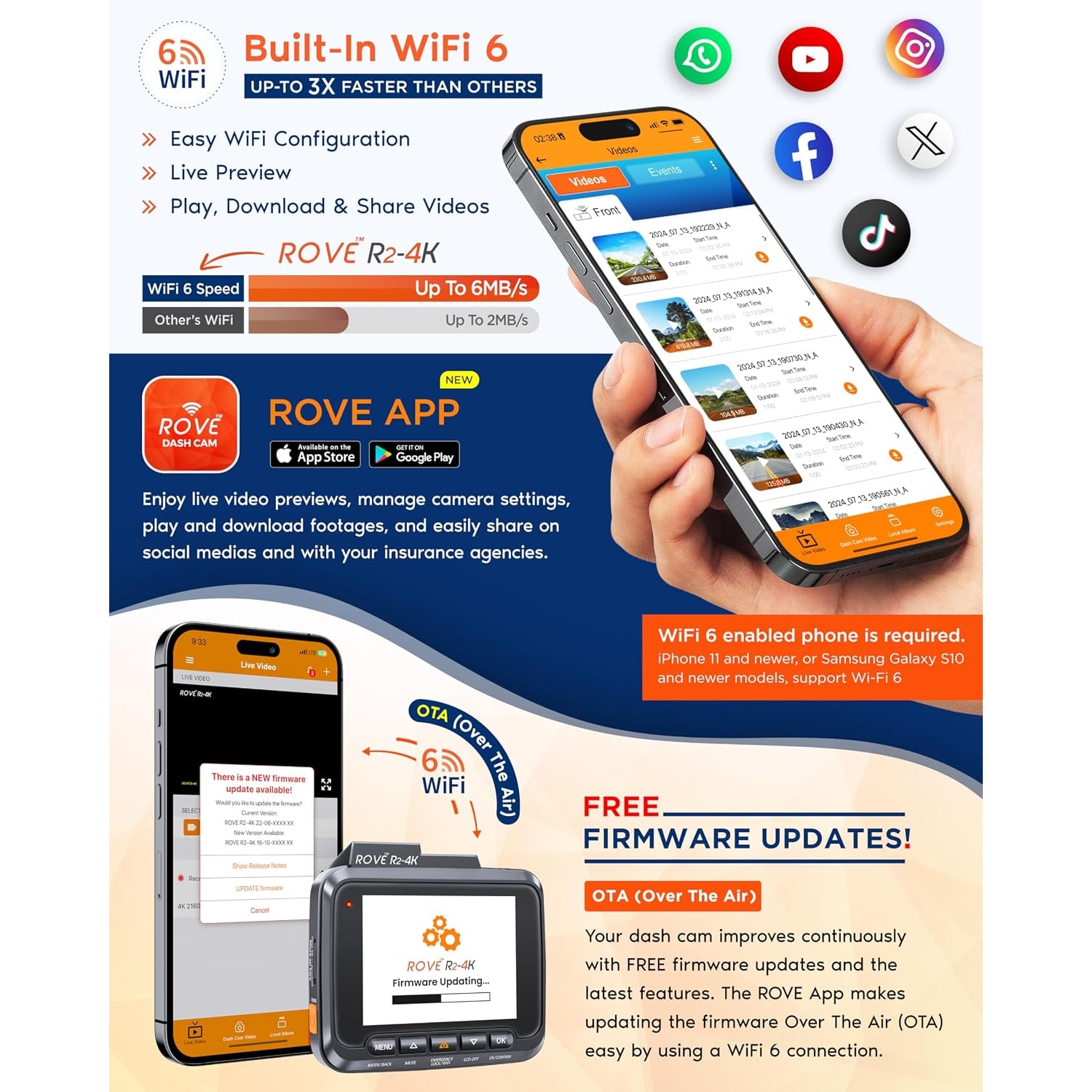
Built-in WiFi connects the camera to the free ROVE app on your phone, so you can watch, download and share a clip without pulling the card out.

Built-in GPS records your route and speed, and you can view the track on a map through the app or the GPS player on a computer.

Loop recording, a G-sensor, motion detection and parking monitor mean the camera manages its own storage and protects the important files.

4K WiFi Dash Cam with GPS

A dash cam earns its keep on the days you wish you had one. A lane change that went wrong, a car that reversed into you at the car park, a motorcyclist who appeared from nowhere in the rain. Memory is unreliable and opinions differ, but a 2160p recording with a time stamp and a GPS track is simply a record of what happened. This front dash camera sits on the windscreen behind the mirror, starts when the car starts, and stays out of the way for the rest of the drive.

4K WiFi Dash Cam with GPS

The picture quality is the main reason people step up to 4K. At 2160p there are roughly four times as many pixels as a 1080p camera, and that extra detail matters most at the edges of the frame where a number plate sits small. The lens uses six glass elements and an f1.5 aperture, which is a wide opening that lets in more light, and that helps when you are driving home through a downpour or along a dim stretch of road at night. The field of view is 150 degrees, so you get the lane ahead plus a good slice of the lanes either side without the heavy curved distortion that very wide lenses produce.

4K WiFi Dash Cam with GPS

Built-in WiFi changes how you actually use the thing. Instead of unscrewing the mount, prising out the microSD card and hunting for a card reader, you open the free ROVE app on your phone, connect to the camera and browse the recordings on the 2.4 inch LCD or on your screen. From there you can play a clip back, download it and send it to your insurer or a family group chat. The app also handles firmware updates over the air, so the camera keeps improving without a trip to a computer.

4K WiFi Dash Cam with GPS

Built-in GPS stamps each recording with your location and speed, and you can follow the route on a map in the app or in the GPS player software. That context is useful when a clip alone does not tell the whole story, because it shows where you were and how fast you were travelling at that moment. The G-sensor watches for sudden knocks and locks the file around an impact so loop recording cannot write over it, and motion detection with parking monitor keeps an eye on the car when it is parked in the car park or at the office.

4K WiFi Dash Cam with GPS

Everything else is built around leaving it alone. Loop cycle recording fills the card and then overwrites the oldest unprotected files, so you never have to clear space by hand. Recordings are saved as MP4, a format every phone and computer already plays. A car charger, charging cable, user manual and warranty card come in the box. The camera takes a microSD card up to 512 GB, and a card is not supplied, so pick one up at the same time if you do not already have a spare high speed card.

Not sure yet? That is fine.

A camera has to suit the job you bought it for, and you cannot always judge that from a photograph. If it is not right for you, send it back within 14 days of delivery in resaleable condition and we refund the price you paid, including standard delivery. That is a voluntary policy we offer on top of your legal rights.

If it turns up faulty, damaged or not as described, that is on us. We pay the return postage, with your protection under the Consumer Protection (Fair Trading) Act 2003 unaffected. Read the full detail on our refunds and returns page, or ask us anything before you order.

Frequently Asked Questions

What is this product?

It is a front-facing car dashboard camera that mounts on your windscreen and records the road ahead in 4K Ultra HD. It has built-in WiFi for phone transfers and built-in GPS for logging your route and speed. The model is the ROVE R2-4K.

What video resolution does it record at?

It records at 2160p, which is 4K Ultra HD. The listed frame rates are 60 fps and 120 fps. That resolution gives you more detail in the frame than a 1080p camera, which helps when you are trying to read something small like a number plate.

How wide is the view?

The field of view is 150 degrees. That covers the lane you are in plus a useful amount of the lanes on either side, without the heavy barrel distortion you get from much wider lenses. It is a sensible balance for a front dash camera.

Does it record the rear of the car as well?

No. The auto part position is listed as front, so this is a single front-facing camera. If you want footage behind the car too, you would need a separate rear unit.

Is a memory card included?

No, a microSD card is not included with the camera. The camera has one memory slot and supports cards up to 512 GB. Buy a high speed card at the same time so you can start recording straight away.

What size memory card should I use?

Use the largest high speed microSD card your budget allows, up to the 512 GB maximum the camera supports. A larger card simply means more hours of footage before loop recording starts overwriting the oldest files. Dash cams write constantly, so a card rated for continuous video is the sensible choice.

How does loop recording work?

The camera records in short clips and keeps filling the card. When the card is full, it writes over the oldest unprotected clip and carries on. Files locked by the G-sensor or by you are skipped, so the important footage stays put.

What does the G-sensor actually do?

It senses sudden movement, such as a knock or hard braking. When it triggers, the camera locks the clip around that moment so loop recording cannot overwrite it. You then still have the footage when you go looking for it later.

Can it record while the car is parked?

It has a parking monitor and motion detection, which are designed to watch the car when you are away. How long it runs depends on the power it has available, since the camera is powered from the car. Many owners wire a dedicated power lead for longer parked monitoring.

How does the WiFi work?

The camera creates its own WiFi connection that your phone joins. You then use the free ROVE app on iOS or Android to view the recordings, download the ones you want and manage settings. It saves you taking the card out every time.

Do I need an internet connection to use the app?

No. The camera connects directly to your phone over its own WiFi, so no mobile data or home broadband is needed for viewing and downloading clips. You would only need internet to upload or share a clip after you have saved it to your phone.

What does the GPS do?

It records your location and speed alongside the video. You can then see your driving route on a map through the app or with the GPS player on a computer. It adds useful context to a clip that video alone cannot show.

Does it have a screen?

Yes, there is a 2.4 inch LCD screen on the camera. You use it to frame the view when fitting the camera, change settings and play footage back on the spot. The app gives you a bigger view on your phone when you want one.

How good is it at night?

The lens has an f1.5 maximum aperture, which is a wide opening that lets in more light, paired with a CMOS sensor. Wide apertures are the main reason some cameras hold detail better after dark than others. It is one of the better specified lenses among the best dash cams for night driving.

Will it cope with heavy rain?

The camera sits inside the car behind the windscreen, so it is not exposed to the rain itself. Footage quality in a downpour depends mostly on your wipers and a clean screen. Keep the glass directly in front of the lens clear and you will get a far better picture.

Does tropical heat affect it?

Cars parked in full sun get very hot inside, which is hard on any electronics. If the car will sit out all day, taking the camera off the windscreen and leaving it in the cabin out of direct sun is the kinder option. Reattaching it takes seconds.

How is it mounted?

It uses a windscreen mount. Most people fit it high on the screen behind the rear view mirror, where it sees the road clearly but does not block your view. Clean the glass thoroughly before fitting so the mount holds properly.

Where is the best place to position it?

Behind the rear view mirror, as high and as central as the mirror allows. That keeps the lens out of your eye line and gives the widest unobstructed view of the road. Make sure the mount does not sit over any tint strip at the top of the screen.

How is it powered?

A car charger and charging cable are included, so it runs from the car's power socket. There is also a built-in lithium ion battery. The battery is there to let the camera finish saving a file safely, not to run it for hours unplugged.

Will it start recording by itself?

Once it is plugged into a socket that powers up with the car, the camera starts recording when you start the engine and stops when power is cut. That hands-off behaviour is the whole point of a car dashboard camera. You just drive.

What video format does it save?

Recordings are saved as MP4 files. That is a standard format, so phones, tablets and computers all play them without extra software. It also makes sharing a clip straightforward.

How do I get a clip to my insurer?

Open the app, find the clip by time, download it to your phone and send it on by email or messaging. You can also take the microSD card out and copy the file on a computer if you prefer. Keep the original file rather than a re-recorded screen video.

What comes in the box?

The included components are a car charger, charging cable, user manual and warranty card. A microSD card is not included. The camera itself is black and weighs 517 g.

What size is the unit?

It measures 6.4 x 6.5 x 3 cm. That is compact enough to tuck behind a rear view mirror in most cars without being noticeable from the driver's seat. Weight is listed at 517 g.

Can I use it in a van or a larger vehicle?

The compatible vehicle type is listed as car, and the mount is a windscreen mount, so any vehicle with a suitable windscreen and a 12V socket should work. Check you have a mounting spot that gives a clear forward view. Position matters more than vehicle type.

How do I look after the camera?

Wipe the lens with a clean microfibre cloth and keep the windscreen in front of it clean, since smears show up in every recording. Use a dry cloth on the body and keep liquids away from the ports. Format the card in the camera every few weeks so files keep saving reliably.

Can I update the camera?

Yes, firmware updates can be delivered over the air through the ROVE app. That means improvements arrive without plugging the camera into a computer. Check the app occasionally to see if an update is waiting.

Is recording other people allowed?

Recording in public spaces is covered by local law, including the PDPA in Singapore, so take care with how you store and share footage. Sharing a clip that identifies other people carries responsibilities. If you are unsure about a specific situation, get proper advice.

Is this a good gift?

It suits anyone who drives a lot, new drivers, and family members whose cars spend time in public car parks. It is practical rather than decorative, which is often what people actually want. The box includes everything needed except a memory card, so adding one makes it a complete present.

What if it is not right for me?

Returns are accepted within 14 days of delivery in resaleable condition with the packaging and accessories included. Get in touch before sending anything back and we will walk you through it. If something seems faulty rather than just unsuitable, tell us what happens and we will help sort it out.

Choosing a 4K Dash Cam, A Practical Buyer's Guide

6 min read Camera Company

The problem a dash cam actually solves

Most drives are uneventful. The one that is not tends to arrive without warning, and then you are standing on the kerb trying to explain what happened to someone who remembers it differently. Two people, two versions, no way to settle it.

That is the gap a car dashboard camera fills. It does not stop anything happening. It just means there is a record, with a time stamp and, on this model, a GPS track showing where you were and how fast you were going. That turns a disagreement into a fact. It is also handy for the smaller annoyances: the car that clipped your wing mirror in a crowded car park, the motorcyclist who appeared from the side without looking, the delivery van that reversed a little too confidently.

A dash cam works best when you forget about it. Fit it once, plug it in, and it starts with the car and stops when you switch off. No buttons to press, no daily routine. The only time you think about it is when you need the footage.

Why 4K matters more than it sounds

Resolution arguments get tedious fast, so here is the practical version. A 4K camera records at 2160p, which has roughly four times the pixels of a 1080p camera. Those extra pixels do not make the video look four times prettier. What they do is preserve small detail.

The small detail that matters on a dash cam is almost always a number plate. A plate four car lengths ahead occupies a tiny portion of the frame. At 1080p that might be a grey smudge. At 2160p there is a real chance of reading it. The same goes for a road sign, the livery on a van, or the face of a junction you are trying to identify later.

The lens matters just as much as the sensor. This camera uses a six element glass lens with an f1.5 maximum aperture. Aperture is the size of the opening that lets light in, and f1.5 is wide. A wide aperture is the single biggest reason one camera sees better than another after dark or under heavy cloud. If you drive home late, or your car park is dim, this is the spec to pay attention to, and it is why wide aperture models tend to top lists of the best dash cam for night driving.

Field of view here is 150 degrees. That is wide enough to catch the lanes either side of you plus a bit of the kerb, without the fisheye stretching that very wide lenses produce at the frame edges. Stretching is a problem because it is exactly at the edges that side-impact detail sits.

How the WiFi and GPS change daily use

Older dash cams had one weakness in common. Getting footage off them was a chore. You unscrewed the mount, worked the microSD card out with a fingernail, found a card reader, and hoped the computer cooperated. Plenty of people never did it, which rather defeats the point.

Built-in WiFi fixes that. The camera broadcasts its own connection, your phone joins it, and the free ROVE app gives you the recordings on your screen. Play one back, download the one you want, send it on. No card removal, no computer, no internet connection required for the transfer itself. If you have just had a scrape, you can hand your insurer a clip from the kerbside while the details are still fresh.

The app also handles firmware updates over the air, which quietly keeps the camera current without you doing anything technical.

GPS is the other half of it. Every recording carries your location and speed, and you can follow the route on a map in the app or with the GPS player on a computer. Video on its own shows what happened. GPS shows where and how fast. Together they answer most of the questions anyone is likely to ask.

Who this suits

If you drive daily, especially in traffic, a front dash camera is one of the easier bits of car kit to justify. The same goes for anyone who parks in public multi-storey car parks or at an office, where door dings and reversing knocks happen with nobody around to see them.

New drivers benefit for a slightly different reason. Having a record removes a lot of the anxiety about being blamed for something, and it tends to encourage a calmer driving style. Parents buying for a young driver often cite that as the main reason.

If your car sits in a covered car porch all day and you rarely drive at night, you could get by with less camera. The 4K resolution and the wide aperture are most valuable to people who put real distance in, drive after dark, or share the road with a lot of motorcycles.

How to choose and what to buy alongside it

Start with resolution and lens, in that order. 2160p plus a wide aperture is the combination that produces footage you can actually use. Then look at the practical features: loop recording so the card manages itself, a G-sensor so the important clip does not get overwritten, and a parking monitor with motion detection for time spent stationary. This camera has all four.

Next, storage. The camera takes a single microSD card up to 512 GB, and no card is included. Buy one with the camera. A dash cam writes to the card constantly, hour after hour, which is harder work than a card ever gets in a phone. A high speed card built for continuous video will last considerably longer than a cheap one, and it is the difference between the best microsd dash cam setup and one that throws errors after a few months. Bigger cards simply give you more hours before loop recording circles back.

Then think about power. A car charger and cable come in the box, so running it from the 12V socket is the simple route. If you want the parking monitor to run for longer stretches while the car is off, a hardwire kit that draws from the fuse box is the usual upgrade. That is optional and most owners start without it.

Finally, consider where it will sit. High on the windscreen, behind the rear view mirror, is almost always right. The lens gets a clear view, the body is hidden from the driver's eye line, and the cable can be tucked along the headlining and down the pillar. Clean the glass properly before fitting the mount, because dust under the adhesive is the main reason mounts let go.

Keeping it working

Dash cams are low maintenance, but not zero maintenance. Two habits cover almost everything.

First, keep the glass clean. The camera looks through your windscreen, so a film of haze or a smear from the wipers lands in every single recording. Give the patch in front of the lens a wipe when you clean the car, and wipe the lens itself with a dry microfibre cloth.

Second, format the card in the camera every few weeks. Continuous writing creates small errors over time, and formatting clears them before they turn into a corrupted file on the day you need it. It takes under a minute in the menu. If a card starts refusing to format or the camera reports errors, replace it rather than nursing it along.

In hot weather, a car left in full sun gets fiercely warm inside. If yours is going to bake in an open car park all day, lifting the camera off its mount and leaving it out of direct sun is kinder to the battery and the electronics. It clips back on in seconds.

One last point on footage. Recording in public is covered by local law, including the PDPA in Singapore, so be thoughtful about storing and sharing clips that identify other people. Keeping a recording for an insurance claim is one thing. Posting it publicly is another, and worth pausing over.

The short version

A 4K dash cam with WiFi and GPS gives you three things a cheaper camera does not. Enough resolution to read a plate, a wide f1.5 lens that holds up in poor light, and a way to get the clip onto your phone in under a minute. Add the GPS route log and you have a record that answers where, when, how fast and what happened.

Fitting takes a few minutes. Running costs are nothing. Buy a good high speed microSD card at the same time, mount it behind the mirror, and then forget about it until the day it matters.

Browse the shop

Not sure if 4K is overkill?

Tell us what you drive and where you park, and we will tell you honestly whether the extra resolution earns its place.

Ask us a question

Page summary

The ROVE R2-4K is a front windscreen dash camera that records 4K Ultra HD video at 2160p, with frame rates listed at 60 fps and 120 fps, through a CMOS sensor and a lens with an f1.5 maximum aperture and a 150 degree field of view. It has a 2.4 inch LCD screen, built-in Wi-Fi with app control through the free ROVE app, and built-in GPS for recording route and speed. Features include loop cycle recording, a G-sensor, motion detection and a parking monitor. Video is saved as MP4 to a single microSD slot supporting up to 512 GB; a card is not included. The unit is black, measures 6.4 x 6.5 x 3 cm, weighs 517 g, and includes a car charger, charging cable, user manual and warranty card. Country of origin is not specified by the maker.